Noelle A Moncibaiz
From two screens to one decision
Routers could see the problem in one system, but had to switch to another to solve it. MOCA brought both sides of the decision together.
%20(1).png)
Role
Lead Product Designer
Platform
Aircraft Routing & Scheduling
Platform
Research → Define → Structure → Design → Validate
01 THE CHALLENGE
Planning aircraft maintenance shouldn't require two systems and ten open windows.
Routers were responsible for keeping aircraft operational while responding to delays, diversions and unexpected maintenance. Critical information, however, was split across OMS and MOCA, forcing them to piece together the situation across multiple screens before making a decision.
02 THE INSIGHT
Understanding how airline routers think under pressure
Before designing anything, I spent time with airline routers, operations teams, and product stakeholders to understand how maintenance planning worked during routine operations and unexpected disruptions. Rather than asking users what they wanted, I observed how they planned work, monitored aircraft, and reacted to changing conditions throughout the day.


What the research revealed
Routers moved between systems to understand the state of an aircraft before deciding what to do.
Routers moved between systems to understand the state of an aircraft before deciding what to do.
Routers moved between systems to understand the state of an aircraft before deciding what to do.
03 THE DIRECTION
Landing pages, Gantt views, unlinked aircraft and flight legs. We mapped the system with routers, stakeholders and the product team before moving into detailed design, ensuring the experience reflected how the work actually happened.

04 THE SOLUTION
The fix was a single Gantt view: aircraft by row, time by column, flight and maintenance blocks laid out side by side instead of split across two systems. Each subfleet got its own color paired with a visible name label, so a router could scan for a specific subfleet at a glance without relying on color alone to tell them apart. Station, fleet type, time range, and maintenance overlay all filter from the same screen, so narrowing down to what matters doesn't mean opening another window.
05 DESIGN FOR REAL OPERATIONS
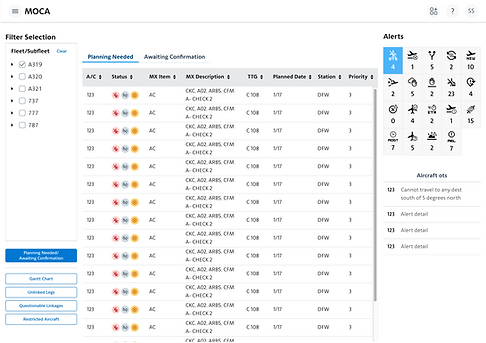
Finding the aircraft that need attention
Filters and status indicators help routers quickly surface issues and focus on what needs action
“Now I just filter for what I need, and it’s all there.”
- Airline Router
-2.png)
Seeing maintenance in context
Maintenance is visualized alongside flights so routers can understand the operational impact at a glance.
“I can actually focus on making decisions instead of just finding information.”
- Airline Router

Handling unlinked flight legs
Unlinked flights are surfaced in the same timeline, making gaps and risk easier to spot and
“I don’t feel like I’m fighting the system anymore.”
- Routing Manager